Security
Today's Scam: The FedEx Delivery Voicemail
A fake delivery voicemail uses urgency and a lookalike FedEx domain to push you off the real delivery channel. Don't tap the link; verify the shipment independently.
By Streets Wired
#Scam Likely #Delivery Scam #Phishing
Reading style
Same story. Different shape.
Scam Likely · Quick Read
Fake delivery voicemail → lookalike link.
An unknown caller says your package has an address problem, gives you a same-day deadline, then tries to move you to a website that only looks connected to FedEx.
Delivery phishing / social engineering. The goal is to pull you away from the carrier's normal delivery channel and onto a site the caller chose.
Unknown call, generic “package problem,” urgent deadline, no useful tracking details, and a lookalike web address.
Report spam. Open the real FedEx app or type fedex.com yourself. Use the tracking number from your retailer or order confirmation.
Don't tap the supplied link, call back, enter passwords or card details, approve prompts, install anything, or “verify” information on the caller's site.
How it happens
Call → voicemail → link → trap.
Important: the last step shows common phishing outcomes. Streets Wired did not visit or analyze the suspicious domain named in this voicemail.
01 / The call
Unknown number. Familiar problem.
The scam starts with something ordinary enough to feel believable: a delivery problem. The caller does not need to know you actually ordered anything. Plenty of people are waiting on a package at any given moment.
Unknown · September 29 · 5:41 AM
<article class="scam-slide" id="scam-step-2">
  <p class="scam-step">02 / The voicemail</p>
  <h3>Pressure lands in your inbox.</h3>
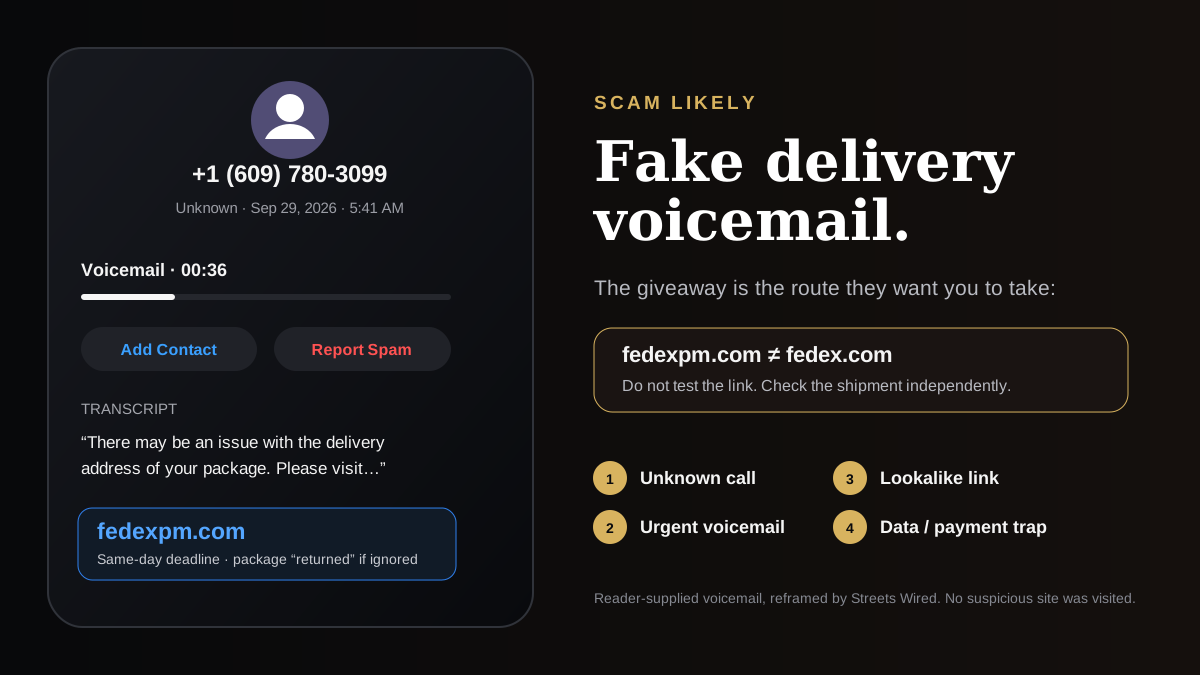
  <p>The 36-second message says there may be a problem with the package address and gives a same-day deadline. It names <code>fedexpm.com</code>. That is a separate domain from <code>fedex.com</code>.</p>
  <img class="scam-evidence" src="/images/editorial/scam-likely-fedex-voicemail.svg" alt="Streets Wired recreation of the reader-supplied voicemail screen showing an unknown caller, a 36-second message, a same-day deadline, and the lookalike domain fedexpm.com." loading="lazy" />
</article>

<article class="scam-slide" id="scam-step-3">
  <p class="scam-step">03 / The link</p>
  <h3>The handoff is the point.</h3>
  <p>The message wants you to stop using the normal way you check deliveries and go where the caller tells you. That handoff is the danger signal. Don't click a suspicious link “just to see what it is.”</p>
  <div class="scam-browser" aria-label="Illustration of a suspicious lookalike website">
    <div class="scam-browser-bar">
      <span class="scam-browser-light"></span><span class="scam-browser-light"></span><span class="scam-browser-light"></span>
    </div>
    <div class="scam-url">fedexpm.com ← not fedex.com</div>
    <div class="scam-browser-body">
      <strong>Safer move:</strong> close the message, open the carrier's official app yourself, or type the known address into your browser.
    </div>
  </div>
</article>

<article class="scam-slide" id="scam-step-4">
  <p class="scam-step">04 / After the click</p>
  <h3>What a phishing page may try next.</h3>
  <p class="scam-slide-copy">We did not test this specific domain. These are common outcomes after someone follows a phishing link:</p>
  <div class="scam-outcomes">
    <div class="scam-outcome"><strong>Confirm the visit</strong><span>The site or redirect chain may learn that the link reached a live device or browser.</span></div>
    <div class="scam-outcome"><strong>Push a prompt</strong><span>You may see deceptive requests to download something, allow notifications, install a profile, or approve another action.</span></div>
    <div class="scam-outcome"><strong>Collect information</strong><span>A convincing fake page may ask for your name, address, login, password, or other personal information.</span></div>
    <div class="scam-outcome"><strong>Ask for payment</strong><span>A small “redelivery” or “verification” fee can become a way to collect card details.</span></div>
  </div>
</article>View the details + what to do if you already clicked
A reader received the 36-second voicemail early on September 29. The automated voice said there might be a problem with a package's delivery address. It urged them to verify an order or delivery details before September 29 or the package would be returned to the sender. The message named fedexpm.com.
<h2>Why we're flagging it</h2>
<p><strong>Our assessment: scam likely.</strong> We have the voicemail, not a verified shipment or access to the site's operator. The decisive warning is the domain: <code>fedexpm.com</code> is separate from <code>fedex.com</code>. The message also gives no tracking number or retailer details that tie the supposed package to a real order, while the repeated opening and same-day deadline create pressure.</p>

<p>FedEx <a href="https://www.fedex.com/en-us/report-fraud.html">warns that scammers contact people by phone about supposed shipment problems</a>. The FTC describes the same delivery-notice pattern: a message claims there is a package problem and sends people to a lookalike site that may ask for personal or payment details.</p>

<h2>If you already clicked</h2>
<ol>
  <li><strong>Opened the page only:</strong> close it. Do not approve prompts or download anything. Install available browser and phone security updates.</li>
  <li><strong>Entered a password:</strong> change it through the real service, not through the suspicious page. Review active sessions and enable multi-factor authentication if available.</li>
  <li><strong>Entered card details:</strong> contact the card issuer using the number printed on the card or in the issuer's official app. Watch for unauthorized transactions.</li>
  <li><strong>Installed something or approved a device/profile change:</strong> remove the unfamiliar item if you can identify it and use the device maker's official security guidance. If you are unsure what changed, get help before entering more sensitive information on that device.</li>
</ol>

<h2>Sources</h2>
<ul>
  <li><a href="https://www.fedex.com/en-us/report-fraud.html">FedEx: How to recognize and help prevent fraud and scams</a></li>
  <li><a href="https://consumer.ftc.gov/articles/how-recognize-avoid-phishing-scams">FTC: How to recognize and avoid phishing scams</a></li>
  <li><a href="https://consumer.ftc.gov/consumer-alerts/2025/04/think-text-message-usps-it-could-be-scam">FTC: Fake package-delivery messages and independent verification</a></li>
</ul>
One more thing: a real package can exist at the same time as a fake delivery alert. Check the shipment independently. Don’t let the caller choose the website for you.
01
Quick read
Scam likely: an unknown caller leaves an urgent delivery voicemail, claims a package has an address problem, and directs you to a lookalike domain instead of the carrier's real site. Verify deliveries in the official FedEx app or by typing fedex.com yourself.
02
What to do
Report the call as spam. Check the shipment independently using a tracking number from the retailer or your order confirmation. If you opened the page, close it and do not approve prompts or downloads. If you entered a password, change it through the real service. If you entered card details, contact the card issuer using the number on the card.
03
Why it works
The message combines a routine problem, a same-day deadline, and a domain that resembles a familiar brand. In the reader-supplied voicemail, the named address was fedexpm.com, which is a separate domain from fedex.com. We did not visit or analyze the suspicious site.
Streets Wired community
Join the conversation
What did this get right, miss, or make you think about?
Sign in to join the conversation.
Anyone can read comments. Posting, replying, and liking require a Streets Wired account.
Sign in / create profile →Member
Streets Wired member
Read freely. Sign in to post.
The conversation
0 responses
Loading the room…
Probe this