Sports
The NFL Made Al-Shaair Erase Wafaa Akila's Name. He Wasn't Banned.
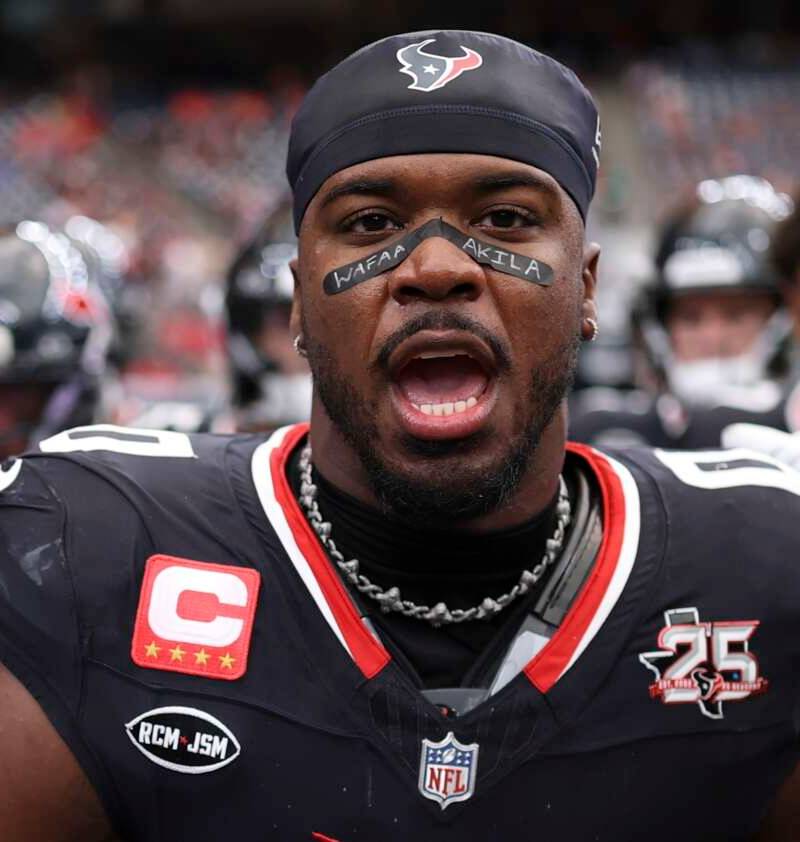
A viral graphic says the Texans linebacker was banned. The reported Week 2 action was a midgame order to remove Wafaa Akila's name from his eye black; he kept playing.
#NFL #Locker Room #Texans
Reading style
Same story. Different shape.
The screenshot travels faster than the correction. A viral post calls Houston linebacker Azeez Al-Shaair “banned” for wearing Wafaa Akila’s name on his eye black. The Athletic reported that an NFL official told him during the September 20 Texans–Bengals game to remove it or he could not continue playing. He did remove it and kept playing. NBC Sports reports no Week 2 fine.
The league had fined him $11,941 for a different eye-black tribute in Week 1. Wafaa and her father were killed in an Israeli strike in Gaza earlier this month, Reuters reported.
Follow the Allegedly source trail and the question behind the uniform rule →
01
The story
The screenshot travels faster than the correction. A viral post calls Houston linebacker Azeez Al-Shaair “banned” for wearing Wafaa Akila's name on his eye black. The Athletic reported that an NFL official told him during the September 20 Texans–Bengals game to remove it or he could not continue playing. He did remove it and kept playing. NBC Sports reports no Week 2 fine.
The league had fined him $11,941 for a different eye-black tribute in Week 1. Wafaa and her father were killed in an Israeli strike in Gaza earlier this month, Reuters reported.
Follow the Allegedly source trail and the question behind the uniform rule →
Streets Wired community
Join the conversation
What did this get right, miss, or make you think about?
Sign in to join the conversation.
Anyone can read comments. Posting, replying, and liking require a Streets Wired account.
Sign in / create profile →Member
Streets Wired member
Read freely. Sign in to post.
The conversation
0 responses
Loading the room…
Probe this